Daily Free software
Email me at juzten@gmail.com to get your ad here!!!
Your Add Here Your Add Here
Showing posts with label windows. Show all posts

Buddi - free finance program

Posted In: , , , , . By Never Surrender


If you are inexperienced with finances and would like to use a free budgeting program check out Buddi. Buddi is a personal finance and budgeting program for the people that have minimum to no experience with finances. Buddi works on almost any computer that has a JVM (java virtual machine) installed on it including Windows, Mac OS X, Linux and others. It supports multiple languages. It can create new accounts from 4 credit types including cash, checking, investment, and savings. It has 5 debit types including credit card, liability, line of credit, loan, and prepaid account. It also lets users’ record transactions and check spending habits along with many other useful features.
Website: Buddi free finance program
Download: Buddi free finance program

StumbleUpon
Add to Technorati Favorites Blogging Blogs - BlogCatalog Blog Directory Blog Directory


SIW – System Information for Windows. This is a really neat and free program to use if you want to know everything about your computer or any computer that you can get your hands on. SIW is an advanced stand-alone EXE program which does not need require installation that gathers detailed information about a system, properties, settings, and displays such as the BIOS, CPU, devices, memory, motherboard, video, drivers and ports. It monitors in real time for the CPU, memory, pagefile usage, network connections, network traffic and much more. The information that SIW finds is divided into a few major categories: software inventory, hardware inventory, network information, network tools, miscellaneous tools, and real-time monitors. With all of the detailed information that SIW finds it can also create a report file in the formats CSV, HTML, TXT, or XML. SIW - System Information for Windows is a free program and can be ran directly from a USB, desktop, server, or web-script so be sure to check it out and add it to your networking toolbox.
Website: SIW - System Information for Windows
Download SIW for Free

StumbleUpon
Add to Technorati Favorites Blogging Blogs - BlogCatalog Blog Directory Blog Directory


encrypt your data with TrueCrypt

Posted In: , , , , , , , , . By Never Surrender


Encrypt your data with TrueCrypt. TrueCrypt is a free open-source encryption program. It creates a virtual encrypted disk in a file and mounts it as a real disk. It encrypts partitions, USB drives, and external hard drives as well. The main thing I liked about it is that it has two levels of plausible deniability just in case you are forced to give up a password. TrueCrypt is supported on Windows Vista, Windows Xp, Mac OS X, and Linux.

Download:TrueCrypt

StumbleUpon
Add to Technorati Favorites Blogging Blogs - BlogCatalog Blog Directory Blog Directory


QTTabBar explorer add-in

Posted In: , , , , , . By Never Surrender

Is Windows Explorer starting to look plain because it doesn't have a lot of features? Try QTTabBar. It is an add-in for Windows Explorer that gives it many features such as tabs, folder grouping, and histories. QTTabBar can be used with Windows Vista and Windows Xp + .Net Framework 2.0 or later.

Download: QTTabBar

StumbleUpon
Add to Technorati Favorites Blogging Blogs - BlogCatalog Blog Directory Blog Directory


UXTheme Multi-patcher 6.0

Posted In: , , , , , , , . By Never Surrender


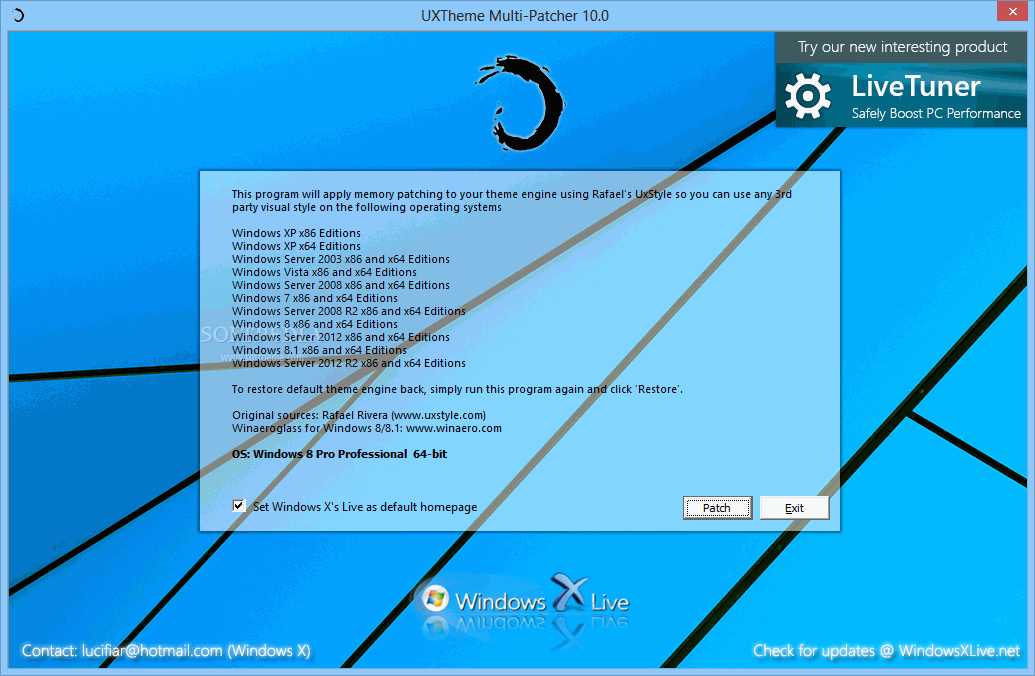
If you like to use 3rd party msstyle themes and use un-signed custom visual styles or want to check them out and add them to your Windows computer then check out UXTheme MultiPatcher. This patch changes your uxtheme.dll and allows for the use of any 3rd party msstyle theme on Windows Xp/SP1/Sp2 or Windows Server 2003. To patch the UXTheme file all you have to do is run the program and it will determine the operating system, then patch the right file and reboot the PC. If you want to un-patch the UXTheme then just run the program again and it will un-patch the .dll file that was changed and reboot the PC again. It is a really simple program to use and is great for the people that want to change the look of there computer.

Visit Softpedia's website to find more information and download the application
UXTheme Multi-patcher 6.0

StumbleUpon
Add to Technorati Favorites Blogging Blogs - BlogCatalog Blog Directory Blog Directory


Unlocker

Posted In: , , , , . By Never Surrender

Do you want to get rid of the annoying messages that pop up in Windows that say : Cannot delete file: Access is denied. If you want to take more control of your Windows system then try Unlocker. Unlocker is a free Windows Explorer extension that lets you right-click the mouse on a file or folder to get rid of common error messages. Learn more about Unlocker or if you want to try it out  Download it from the official website. Unlocker is freeware

StumbleUpon
Add to Technorati Favorites Blogging Blogs - BlogCatalog Blog Directory Blog Directory


Eraser

Posted In: , , , , , , , , , . By Never Surrender


Do you need to completely remove sensitive data or files from your hard drive? Eraser is a free security tool that removes data from a hard drive by overwriting it several times with selected patterns. Data like passwords, personal information, classified documents, and financial records are some of the stuff that someone might want deleted but with the normal Windows Vista or Windows XP the data isn't totally erased. So before the file is overwritten it can be easily retrieved with retrieval software. This is where Eraser comes in. Here is a list of features that Eraser has.

-Erases Files/Folders that were only previously 'deleted'.
-Erases all hard drives using 'Darik's Boot and Nuke' method.
-Erases Index.dat on Reboot
-Erases Encrypted Files and Drives.
-Erases FreeSpace on 95, 98, ME, NT, 2000, XP and DOS.
-Erases contents of the Recycle Bin.
-Erases Compressed Files and Drives.
-Erases Network Files, Floppy Disks, CD-RW, DVD-RAM, DVD-RW.
-Erases Windows Temporary Files.
-Erases Internet Cookies.
-Erases Paging (swap) file.
-Erases Internet Cache.
-Appears as an 'Erase' option on the Context Menu of Windows Explorer and Recycle Bin.
-Comes with an Eraser Scheduler that allows you to create user-defined tasks.
-Defeats File Recovery software applications Hardware tools.
-Supports FAT32 and NTFS Files Systems.
-Eraser is easy to use and comes with a dedicated support network.


Learn more-Eraser
Download-Eraser

StumbleUpon
Add to Technorati Favorites Blogging Blogs - BlogCatalog Blog Directory Blog Directory


InfoTag Magic

Posted In: , , , , , , , , . By Never Surrender


InfoTag Magic is a freeware Windows shell infotip extension that finds tags for ID3, WMA, APE, or OGG file types. InfoTag Magic displays tag fields in a tooltip window when the mouse pointer is hovered over a file in windows explorer and provides a quick preview for plain text files in the formats of TXT, INI, LOG, BAT, DIZ, BAK, and QUE. So if you need to find a certain text file but don't want to open a number of different files, you can hover over a text file and InfoTag Magic displays the first five lines of that file in a tooltip window. Also shortcut properties and version information of exe. file an infotip is displayed. Here is more information on InfoTag Magic and here is a direct download link for todays daily free software

StumbleUpon
Add to Technorati Favorites Blogging Blogs - BlogCatalog Blog Directory Blog Directory


Pitaschio

Posted In: , , , , , . By Never Surrender


Do you want to make your computer easier to use? Pitaschio is a freeware program to help you do that with Microsoft Windows. Pitaschio includes a variety of useful functions such as: Snap a window to other windows when moving and resizing, Always keep a window above all other windows, Restrict a window position to inside of the screen, Minimize a window to the system tray, Use small icons in the desktop, Disable Windows key, Insert key, Alt key etc., Lock the mouse or keyboard while cleaning them, Take statistics about mouse and keyboard, Calculate Moon's age, Control the sound volume using the mouse wheel, and Display the sound volume level on the screen. Pitaschio is a great tool to make windows more efficient. Here is more information and the download page for Pitaschio.

StumbleUpon
Add to Technorati Favorites Blogging Blogs - BlogCatalog Blog Directory Blog Directory


Taskbar Shuffle

Posted In: , , , , , . By Never Surrender


Taskbar Shuffle is a free program that lets you re-arrange your taskbar buttons and system tray icons. It is a simple program to use, very small, and is a free utility program. Reorder your taskbar buttons by dragging and dropping them, Reorder your tray icons in the same way, Reorder tasks in a grouped button's popup menu in the same way, Middle-click to close programs on your taskbar, Works with UltraMon taskbars, and Tweak taskbar button grouping. If you are a power user then this is the perfect free application for you. More Info or Download with Installer or with out installer

StumbleUpon
Add to Technorati Favorites Blogging Blogs - BlogCatalog Blog Directory Blog Directory


Vista Start Menu

Posted In: , , , , , . By Never Surrender


Are you still using Windows XP and don't want to upgrade to Vista? Or are you using Vista and want a better start menu. Well the free program Vista Start Menu gives you the feel of Vista's Start Menu but adds a lot more features and customization. It lets you instantly find what program you are looking for. It is easy for a beginner to use and easier for advanced users to get used to. Vista Start Menu is a great alternative to the old Windows XP and the new Windows Vista start menu. Want to learn more about this free alternative to Windows Start Menu? Try it out and let me know how it works for you. It works on Windows NT, 2000, 2003, XP, and Vista.

StumbleUpon
Add to Technorati Favorites Blogging Blogs - BlogCatalog Blog Directory Blog Directory


FreeCommander

Posted In: , , , , , , . By Never Surrender


Are you still using the standard windows file manager? If you are and you want something easier to use then check out FreeCommander. FreeCommander is a free, easy-to-use alternative file manager for Windows OS. It can also be taken anywhere by adding the installation directory on a CD or USB-Stick. Some of the great features that FreeCommander offers is a dual-panel technology, tabbed interface, tree view for each panel, file viewer for hex, binary, text, or image formats, built in FTP client, copy, move, delete, rename files and folders, multi rename, wipe files, and DOS command line. So if you are using Windows, and I bet that if you are using Vista you will want to try this free program out. Want to learn more about FreeCommander and it's great features. Try FreeCommander and start making life easier.

StumbleUpon
Add to Technorati Favorites Blogging Blogs - BlogCatalog Blog Directory Blog Directory


Wise Registry Cleaner

Posted In: , , . By Never Surrender


Wise Registry Cleaner is a registry cleaning tool for Windows operating systems. It removes junked-up registry files that slow down a PC. A lot of programs don't remove there files from the registry when you uninstall them, therefore adding more junk files to your hard drive. It can backup the registry before it scans, it tells you which files are good and bad to delete and it is one of the safest registry cleaners on the market.

StumbleUpon
Add to Technorati Favorites Blogging Blogs - BlogCatalog Blog Directory Blog Directory


Defraggler

Posted In: , , , , . By Never Surrender


Need a free defragging tool. Try defraggler with your system. It has advantages over Windows defragmetation tool like enabling you to quickly and easily drag the files you want to defrag so you don't have to defrag the whole drive. Learn more about Defraggler or go and download this free defragmentation tool and get your system running faster and smoother.

StumbleUpon
Add to Technorati Favorites Blogging Blogs - BlogCatalog Blog Directory Blog Directory


ClipX

Posted In: , , , , . By Never Surrender


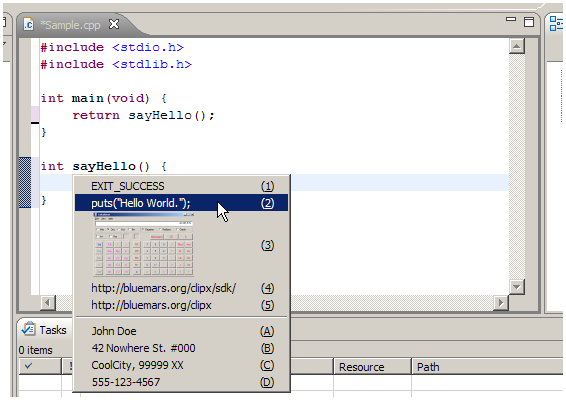
ClipX is the perfect clipboard history manager. It captures files copied to the Windows Clipboard. The copied files can be retrieved via a hotkey or a right-click menu . Under the right-click menu you can set a number of features and settings that are useful in everyday computer usage. It supports bitmap and text clips . ClipX is easy to use and is free for you. If you want to learn more about the program or you want to download it go to the provided link. ClipX free text clipboard

StumbleUpon
Add to Technorati Favorites Blogging Blogs - BlogCatalog Blog Directory Blog Directory


XNeat

Posted In: , , , , , , . By Never Surrender


XNeat is a free application that adds display customization to extend the Windows Titlebar, Taskbar, and System Tray Utilities. It enables you to minimize a window to an icon in the system tray, make a window be on top of all others,re-arrange the order of taskbar items by dragging them, and hide any window or tray icon. Two cool things you can hide is the Start button and the Clock as well as many other elements. XNeat is very easy to navigate. It's integrated into the right-click menu. Learn more about the free windows extender or download it from this direct link...XNeat

StumbleUpon
Add to Technorati Favorites Blogging Blogs - BlogCatalog Blog Directory Blog Directory